
What Amara does today
Amara features for law firms
A legal copilot inside each matter, document review, drafting, Amara Work, a CRM built for law firms and practice management, all on one platform.
- Today: legal copilot, document review, drafting in English, matters, CRM, Amara Work, teams and permissions.
- Coming soon: a US legal corpus built from official sources, starting with federal law and then California, Texas and Florida.
- Coming soon: Amara's result on US bar exam questions, with the full methodology.
- Available in the US today
- Data stored in the EU
- Never used for training
- The attorney always decides
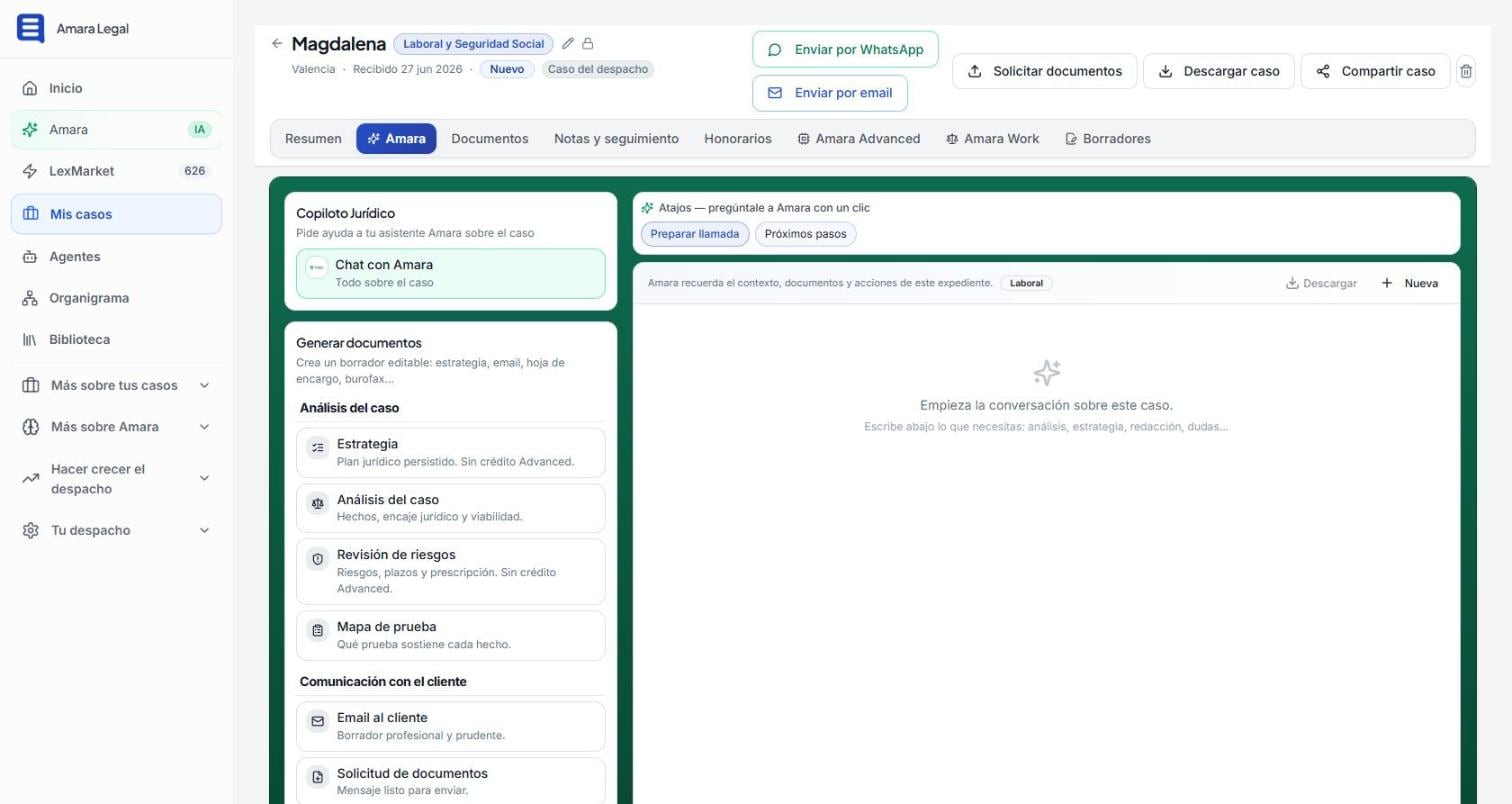
Amara is not a legal chatbot: it is an AI platform for the whole law firm. It organizes each case in the CRM and in the matter, and its AI works with the firm’s real context: a legal copilot, Amara Advanced for in-depth reasoning and Amara Work for handing over complete pieces of work. All of this already works in the US; the US legal corpus is coming soon.
What level of legal AI is Amara at?
The difference between legal AI tools lies in the context they know and their ability to work on their own. Amara works at level 4 of this scale: it does not only work inside the matter but across the whole firm, and it carries out complete tasks from a single instruction.
| Level | What the AI knows | Example of use |
|---|---|---|
| 0. Chat without context | Nothing: each conversation starts from scratch | General legal questions |
| 1. The document | The file you upload in that conversation | Summarizing a contract. This is where many tools stop |
| 2. Conversation with memory | What has been said and several documents in one space | Continuing a case over several sessions |
| 3. The matter | The case: client, facts, documents, tasks and steps | Preparing the strategy for a case |
| 4. The whole firm | Every case, client, deadline and opportunity, and it works on its own within the firm | Amara: from one instruction it prepares a complete matter file with pleadings, motions, briefs, demand letters and client communications |
Amara thinks before it answers
Before answering, Amara understands the question, reviews the case and the documents, takes into account what already exists in your firm and reasons by comparing sources. That is why it works on your real case rather than giving a generic answer. You can work with it in four ways:
- Amara: the legal conversation for quick questions.
- Amara in the matter: the copilot inside each matter.
- Amara Advanced: advanced reasoning across the whole matter.
- Amara Work: the AI that works for you and prepares the complete piece of work from one instruction.
Starting a day on which Amara has already worked for you
When you log in, Amara has already reviewed the firm: it shows the cases that need attention, with their real tasks, deadlines and commitments, and direct access to Amara Work. The copilot is present on every screen, not in a separate window.
A legal copilot inside the matter
Inside each case, Amara remembers the context, the documents and the steps taken in the matter. You can talk to it or use the direct actions:
- Shortcuts: prepare a call, analyze risks, request documents, next steps and opposing counsel’s likely strategy.
- Documents it prepares: client letter, document request, strategy, case analysis, risks and deadlines, evidence map, review of draft pleadings and demand letters.
Amara Advanced: reasoning across the whole matter
For the cases that call for it, Amara Advanced delivers deeper work: not a quick counter-strategy from the summary, but a reasoned counter-strategy based on the whole matter, with the other side’s arguments, the evidence supporting them and a prepared response.
- Reasoned strategy and counter-strategy
- Likelihood of success and preparation for negotiation
- Procedural risks, contradictions between documents and chronology
- Review of pleadings and motions and preparation for hearings
Amara Work: hand over the work
Amara Work does not answer questions: it takes an assignment and carries it out. From one instruction it can prepare a complete matter file, with pleadings, motions, briefs, demand letters and client communications, and it saves each result to the matter, with the steps, the risks and the sources it used, for you to review. See Amara Work.
Examples from US practice
| Area | Example task |
|---|---|
| Employment | Analyze the employment agreement and the circumstances of the termination and prepare the demand letter to the employer |
| Family | Summarize a divorce matter, organize the information on custody and parenting time and prepare the draft |
| Landlord-tenant | Analyze the lease and the parties’ obligations and prepare the letter to the landlord or the tenant |
| Consumer claims | Put the facts and documents of a complaint in order and prepare the demand letter |
| Privacy | Review a data practice and prepare the response to a consumer’s request to access their personal information under the applicable state privacy law |
CRM: my cases
- Board by stage: new, contacted, documents pending, ready for review, awaiting payment, in progress, closed and not viable, with alerts for stalled matters.
- Three views: board, list and by team.
- Creating cases by dictation, by uploading documents or by hand, with a draft you review before saving.
- Case record with an AI-generated summary and direct actions: send by WhatsApp or email, request documents, download and share the case.
- Export to PDF and DOCX.
Document and knowledge library
All the documents from every case in one place, classified (documents, evidence, invoices), searchable and linked to their case. It accepts PDFs, spreadsheets, text documents, images and attachments received by WhatsApp, and reads scanned documents.
Private knowledge library. Upload the opinions that support your position and your own work product so that Amara works with them when you decide. Each document can be pseudonymized or anonymized before it is added and, in a network of firms, each firm contributes whatever it chooses to the shared library.
Practice management and teams
- Roles and permissions per user, enforced at data level.
- Several offices and several firms with a hierarchy of permissions, also designed for networks of firms.
- Fee arrangements: flat, contingency or hybrid fees and payment plans.
- WhatsApp built into the matter: the client receives a message from an official number when the case is created and the conversation is kept on their record. The AI does not take part in this channel: the client relationship belongs to the attorney.
- Custom AI agents for client intake, matters, documents, deadlines, clients, practice areas, management and legal marketing.
Legal sources and security
- Corpus with verifiable references: in Spain, almost 3 million legal units; in the US, federal law first and then state law state by state, built from official sources (U.S. Code, eCFR, Federal Register and court opinions), coming soon. The US legal corpus.
- Your data does not train the AI: an express clause in the data processing agreement, under which Amara acts as processor and service provider, and also switched off in the providers’ settings. Database and files are stored encrypted in the EU (AWS Paris); US data hosting for US firms is in preparation.
- Declared AI models: Amara uses models from OpenAI and Anthropic and says so openly.
- Human review: Amara proposes; the attorney reviews, signs and decides, and client confidentiality and attorney-client privilege stay at the center. Security.
Frequently asked questions
Do I need to install anything?
No. Amara runs in the browser, on desktop and on mobile.
Can I use Amara just as a CRM?
Yes. LexCRM can be used on its own for $9.99/month + applicable taxes, with the first 3 months free.
Does it work in American English?
Yes. Amara analyzes and drafts in English; the app interface in English is in preparation.
Bring legal AI into the way your firm already works
Join our founding firms in the US and follow the arrival of the US legal corpus from the inside.